
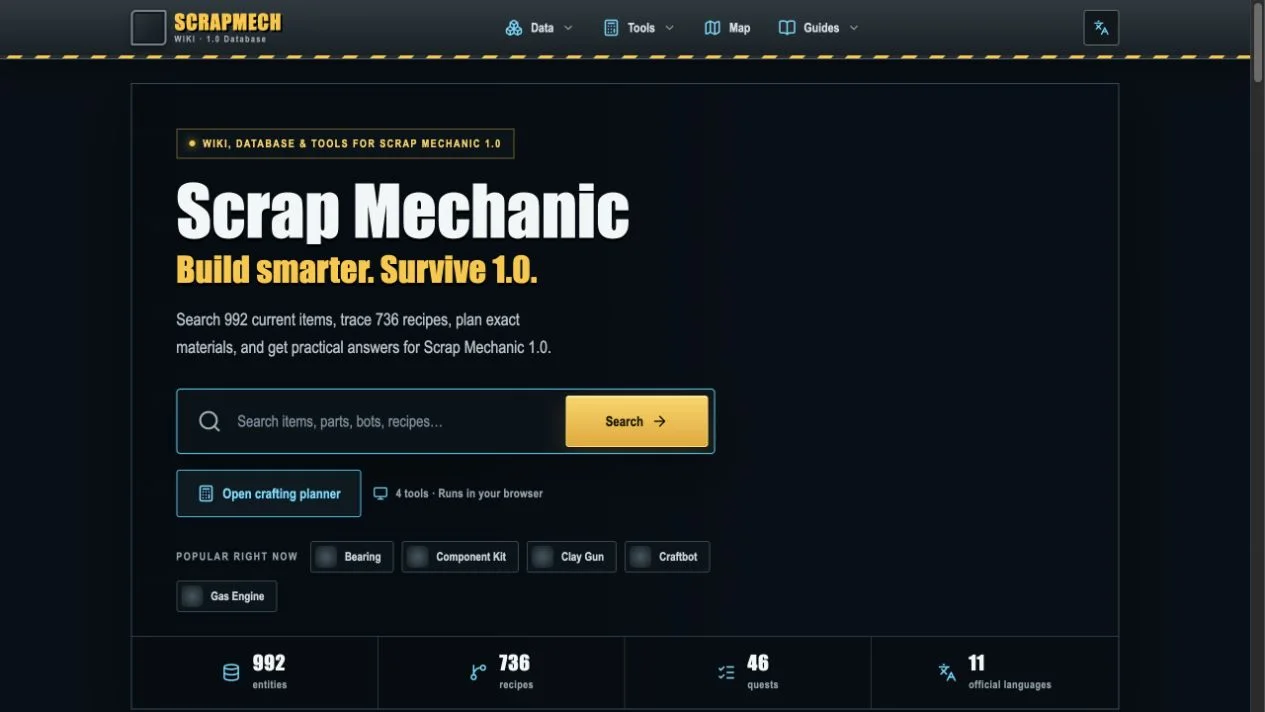
Current data for a game that changed substantially
We are publishing ScrapMech Wiki as a versioned reference for Scrap Mechanic 1.0. The site is built around data extracted and normalized from the current game files, identified on the page as build 1.0.0.867. That boundary matters because old advice, especially around Survival progression, recipes, schematics, saves, and raids, can look plausible after a major release while describing rules that no longer apply. Every item, recipe, quest, and raid value in the database is tied to a known version and can be regenerated when the game changes.
The launch index contains 992 entities, 736 recipes, 46 quests, and eleven official interface languages. Those figures are not presented as a reason to scroll through one enormous list. The home page directs players to the question they are trying to solve: identify an item, trace a recipe, calculate materials, inspect a blueprint, estimate a crop raid, or locate a confirmed Survival destination. The result is a database that behaves more like a workbench. Records are useful on their own, but they are also inputs to four tools that perform the repetitive calculations players normally rebuild in notes or spreadsheets.
An item database with forward and reverse recipe context
Database records cover blocks, interactive parts, tools, weapons, resources, garments, bots, stations, consumables, and other released identities. Category filters and named search make it possible to narrow the catalog without remembering an internal identifier. A detail page can show current properties, modes, variants, descriptions, recipe methods, and reverse-use relationships. The difference between Recipes and Used in remains explicit: one explains how the current item can be produced, while the other identifies methods that consume it. That distinction prevents an ingredient relationship from being mistaken for an acquisition route.
Recipes keep their output quantity, ingredient quantities, station, time, trade or processing context, and schematic gate when the released data provides them. Multiple routes remain separate because a Craftbot method, a trade, and a schematic-gated station are not interchangeable just because the output name matches. The recipe browser supports direct comparison, while item pages connect the same methods to the object they create. This shared model lets the planning tools use the exact catalog visible to readers instead of relying on a second set of hidden calculator assumptions.
The Crafting Planner expands real batches and shared ingredients
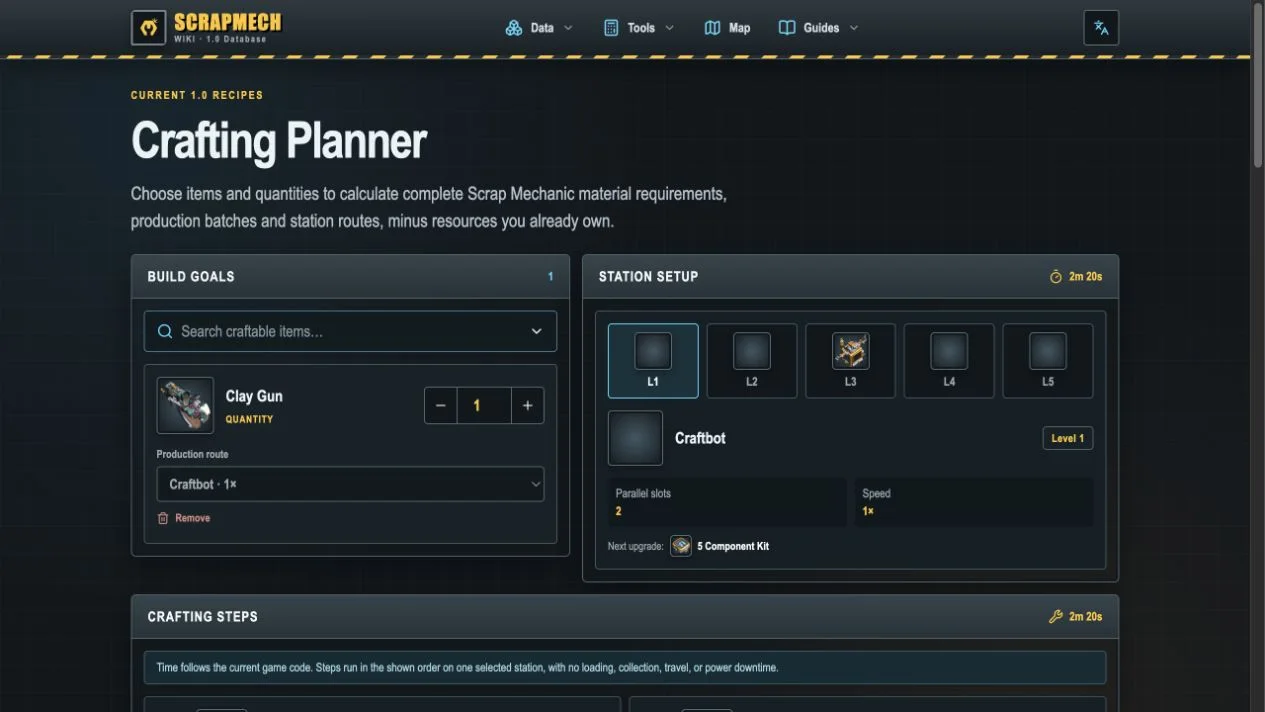
The Crafting Planner begins with finished goals rather than asking the player to enter every intermediate part. Select an item and quantity, review the production route, and the tool recursively expands craftable dependencies until it reaches a base material or a path that should not be expanded. Every target is rounded up to complete recipe batches. Output beyond the immediate requirement becomes surplus and can satisfy another dependency in the same plan, which prevents shared ingredients from being crafted twice when several goals are calculated together.
The launch example plans a Clay Gun through the Craftbot route and exposes each step, batch count, processing time, and consolidated material requirement. Station profiles include level, speed, parallel slots, and upgrade context. Owned quantities can be entered against the base list so the remaining total becomes a collection checklist. Timing follows the current recipe and crafter rules, but it is labeled as processing time rather than a promise about a live base: walking, transferring stacks, fuel, power, output collection, and independent stations running in parallel remain outside the estimate.
Blueprint analysis stays on the player’s device
The Blueprint BOM Analyzer accepts a local .blueprint file and counts official blocks and parts, joints, controllers, containers, stored items, and paint colors. Parsing happens in the browser; the selected file does not need to leave the device. This makes the tool suitable for a quick bill of materials or a structural inventory without requiring an account or an upload. Named official components can link back to the database, helping a reader move from a count to the properties and current record for that part.
A blueprint bill of materials is intentionally not described as a complete Survival crafting bill. A creation can contain blocks or parts that have different acquisition paths, quantities, upgrades, or progression gates, and the blueprint format records placed content rather than every step needed to manufacture it. The analyzer therefore answers what is present in the file. Players can use that result as a build inventory, then move relevant targets into the Crafting Planner when they need recipe expansion, batch rounding, owned-material subtraction, and station routes.
The Raid Calculator separates exact rules from forecasts
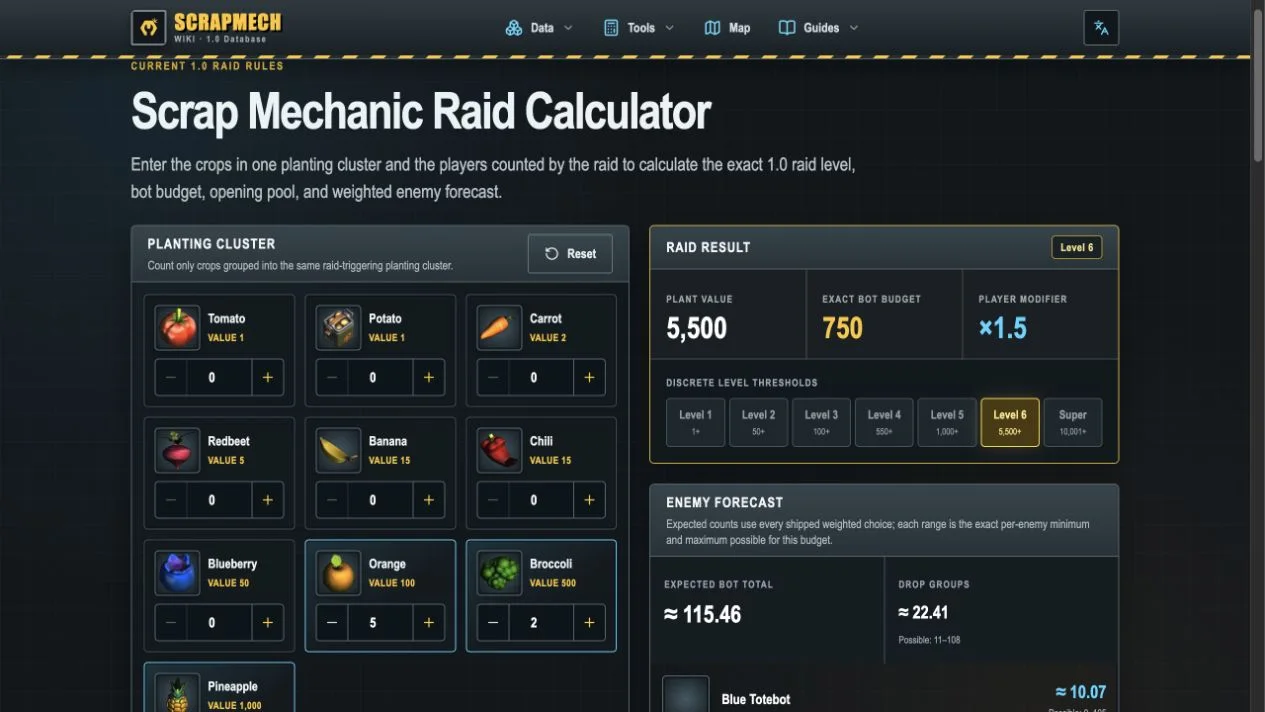
The Raid Calculator applies the current 1.0 crop values, planting-cluster rules, level thresholds, multiplayer modifier, and bot budget. Enter counts for ten crop types and one to four players; the tool calculates the plant value, exact raid level, within-level budget, opening pool, affordable groups, probabilities, expected enemy counts, and mathematical per-enemy ranges. In the captured example, four pineapples, two broccoli, and five oranges produce a value of 5,500. With two players counted, the result is Level 6, an exact bot budget of 750, and a ×1.5 player modifier.
The interface also explains what cannot be exact. The game repeatedly chooses weighted groups until none are affordable, and the live random sequence is not stored in the released data. The final bot list is therefore a forecast even when value, level, budget, eligible groups, and probability calculations are exact. Spawn direction, exact points, pathfinding, and terrain reachability depend on the running world. Presenting those boundaries beside the result keeps probability from being mistaken for a deterministic prediction and makes the calculator more reliable for defensive planning.
Current raid timing replaces outdated safe-crop folklore
The calculator documents several rules that are easy to miss when using an older crop-count chart. Any positive crop value begins the current 60-second countdown. Crops within ten game units merge into one planting cluster, and the raid manager associates an area using a 96-unit radius. Adding a crop during the first ten seconds resets the countdown to 60 seconds. The opening group begins twelve seconds after the attack phase starts. Removing crops can recalculate the raid before groups are generated; after generation, the selected groups remain locked.
Level thresholds begin at values 1, 50, 100, 550, 1,000, and 5,500. The Super condition is strictly greater than 10,000, so exactly 10,000 remains Level 6 and 10,001 crosses the boundary. Extra players increase the budget by 50 percent of the level minimum until the modifier reaches its ×2 cap at three players; a fourth does not raise this specific modifier further. These facts are shown as rule explanations, not hidden in a result, because understanding why the level changed is more useful than receiving one unexplained enemy number.
The map distinguishes a reference world from a local save
The Scrap Mechanic Interactive Map provides a complete reference world with fourteen current location cards, including the Crashed Ship, Mechanic Station, Hideout, Packing Stations, Scrap Garage, Growlabs, and story areas. Search, category filters, grid context, and exact confirmed coordinates help compare destinations without implying that one seed is a universal Survival world. A reference view is useful for learning relationships and verifying named locations, but the site keeps its scope visible when procedural terrain can differ.
Players can also select a local Survival .db save to render their own terrain in the browser. Like blueprint analysis, this path is local by design: the file can be interpreted without uploading a personal world to the site. The distinction between the reference and local view is important. One explains confirmed locations and general structure; the other reflects the player’s actual generated world. Both can support a route, but neither substitutes for live conditions, unexplored terrain, or the decisions a player makes while moving through the save.
Practical guides remain anchored to current records
Guides cover the 1.0 release, returning-player save compatibility, crafting and schematics, quests, and the boundaries of the current database. Each can link back to exact item, recipe, quest, or tool results. This matters when a guide contains a recommendation rather than a raw value: readers can inspect the record that supports the step and see the data version attached to it. The site also keeps official game rights and an unofficial-resource notice visible, so extracted values and referenced assets are used to explain game content rather than suggest affiliation.
ScrapMech Wiki is now live at scrapmech.wiki. Use the database when identifying a part or tracing its uses, the Crafting Planner when several goals share materials, the Blueprint Analyzer when a local creation needs an inventory, the Raid Calculator when crops turn into a defensive risk, and the map when the world itself is the problem. The site will be regenerated and reviewed as the game updates. Its standard is straightforward: use released rules for exact answers, label weighted outcomes as forecasts, and keep every tool tied to the version and records a player can inspect.